Which Jobs Does AI Replace? An Honest CFO Answer
A finance leader sent me 19 open roles and asked which AI would replace. Here is the honest, role-by-role answer: replace vs augment vs low-impact.
By Mike Hodgen
The Screenshot That Started It
A finance leader at a family-owned manufacturer sent me a screenshot last quarter. Nineteen open roles, a tidy spreadsheet, salary bands attached. The message underneath was one line: "How many of these do we not need if we do AI right?"
It is the question every CFO is quietly asking. It is also the wrong one.
I get why people frame it this way. The board is asking about AI strategy, the labor budget is real, and AI vendors keep promising to "do the work of ten people." So the natural move is to treat AI as a headcount calculator: feed in the roster, get back a layoff list.
Here is the problem. Framing AI as a replace-or-keep binary is wrong analytically, and it is toxic culturally. The day your team believes AI means cuts, they stop feeding it good data and quietly sabotage the rollout. And the math underneath the binary is almost always wrong, because almost no knowledge-worker role is fully automatable in the first place.
So I did not answer with a number of bodies. I answered with a tiered analysis.
I run 29 automation modes in production inside a real DTC fashion brand I run out of San Diego. I have shipped more than 15 AI systems across pricing, content, customer service, and product creation. So when I look at a roster, I am not theorizing about what AI might do someday. I am reading it against systems I have actually built and measured.
This is the honest version of which jobs does AI replace, and it starts by throwing out the layoff-list framing entirely. The useful answer is not a body count. It is a map of where capacity hides.
Why "How Many Jobs Will AI Cut" Is the Wrong Question
The binary framing breaks adoption
The replace-vs-keep question fails on two fronts at once.
The first is cultural, and it is the one CFOs underestimate. The moment staff hear that AI means layoffs, adoption dies. People stop documenting their workflows. They stop flagging edge cases. They feed the tools the bare minimum and root for them to fail.
I have watched this happen. The single biggest predictor of whether an AI rollout works is not the model or the budget. It is whether the people doing the work believe the tool is on their side. A headcount-cut frame guarantees it is not.
What CFOs actually want to know
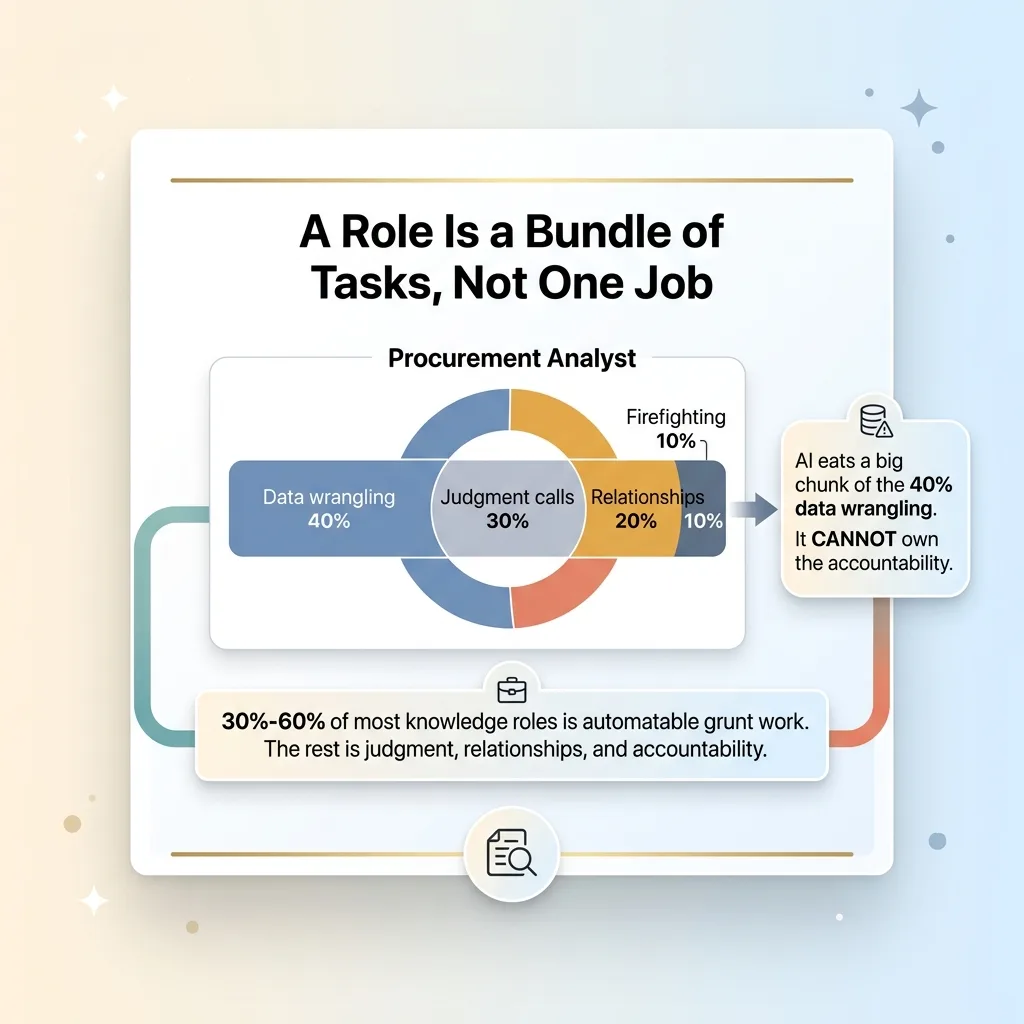
The second failure is mathematical. Pull apart almost any knowledge-worker role and you find a bundle of tasks, not one job. A procurement analyst is maybe 40% data wrangling, 30% judgment calls, 20% relationships, 10% firefighting. AI can eat a big chunk of the first slice. It cannot own the accountability.
 Role as a bundle of tasks, not a single job
For most roles, 30% to 60% is automatable grunt work. The rest is judgment, relationships, and someone whose name is on the decision. That is the whole AI augment vs replace workforce question in one sentence: you are not removing people, you are removing tasks.
So the real CFO question is not "how many people do I cut." It is "how much capacity can I redeploy, and at what proven ROI." That reframe changes everything downstream, and it points straight at a three-tier model.
The Three Tiers: Replace, Augment, Low-Impact
This is the framework I ran against those 19 roles.
 The Three-Tier AI Impact Model
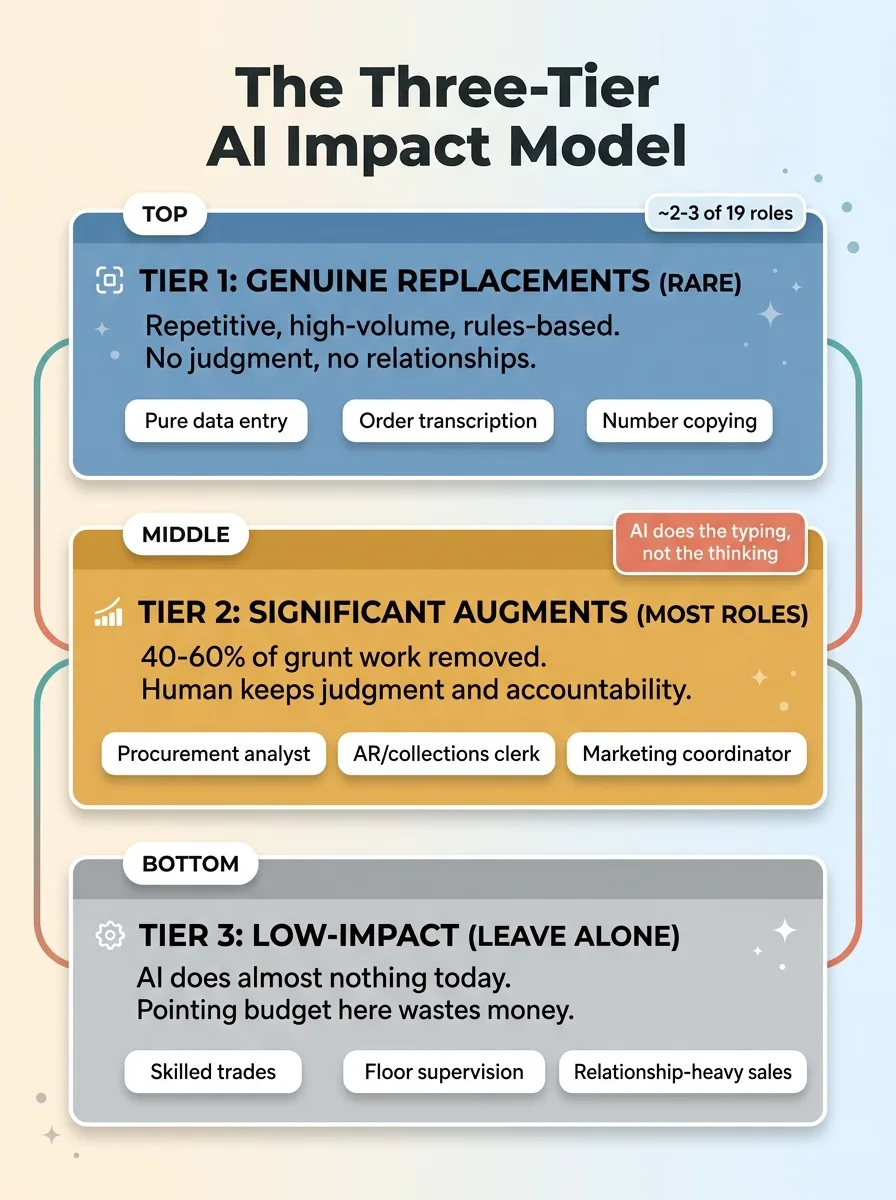
Tier 1: Genuine replacements (rare)
A small number of roles are almost entirely repetitive, high-volume, rules-based processing. No client relationship. No judgment. Think pure data entry, order transcription, copying numbers from one system into another all day.
These are genuine replacements. They are also rare. On that roster of 19, maybe two or three qualified, and even those usually carried a sliver of exception-handling a human still needed to own.
If a vendor tells you most of your roster is Tier 1, they are selling, not analyzing.
Tier 2: Significant augments (most roles)
This is where the majority live. A procurement analyst. An AR/collections clerk. A marketing coordinator.
AI removes 40% to 60% of the grunt work in these roles. The drafting, the first-pass reconciliation, the data formatting, the research scaffolding. One person starts doing the work of two, sometimes two and a half. But the human stays, because the judgment and the accountability stay.
The distinction that matters: AI handles the typing, not the thinking. Every system I ship stops for a human at the decision point. The model drafts the dunning email and flags the discrepancy. A person decides whether to send it and signs off on the call to a key supplier.
That is augmentation. Faster human, same accountability.
Tier 3: Low-impact (leave them alone)
Some roles get almost nothing from today's AI. Skilled trades. Floor supervision. Relationship-heavy enterprise sales.
I tell CFOs this plainly because honesty here is what makes the rest of the analysis credible. AI does very little for a senior salesperson who closes deals on a golf course or a floor supervisor who reads the room and the machines at the same time. Pointing AI at these roles wastes budget and erodes trust.
When I tag a role Tier 3, I am telling you where not to spend. That is worth as much as knowing where to spend.
How I Put a Conservative ROI on Each Role
This is the part CFOs respect, because it is the part vendors skip.
Count the automatable hours, not the salary
I never claim AI replaces a salary. That is the math trick that gets companies burned. A role is not a line item you delete. It is a set of hours, only some of which are automatable.
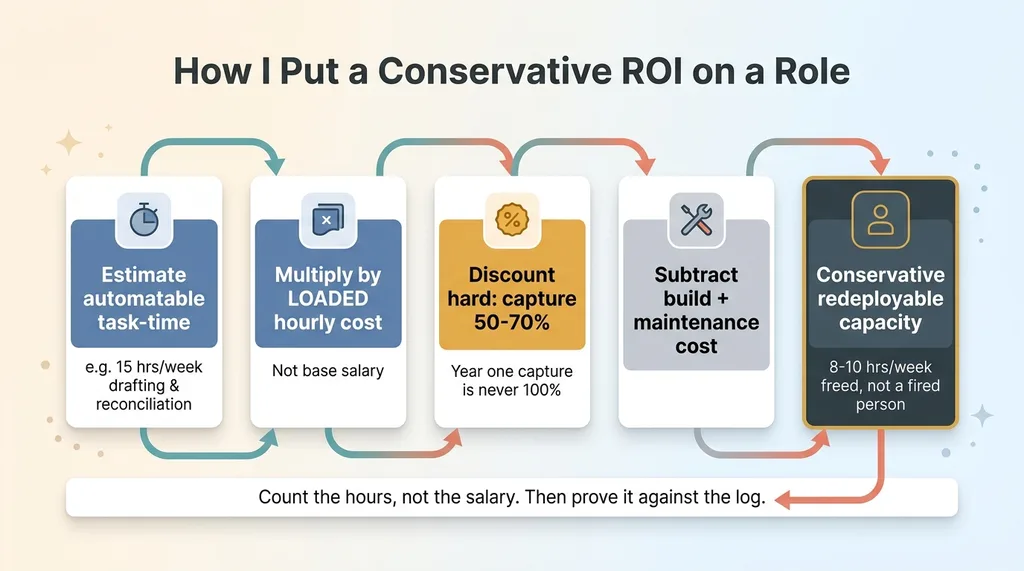
So I estimate the share of the role that is automatable task-time. Then I multiply by the loaded hourly cost, not the base salary. That gives a defensible ceiling on the value, tied to actual work, not headcount fantasy.
Discount it hard
Then I discount it, hard.
 Conservative ROI calculation method
Year one capture is never 100%. I model 50% to 70% of the theoretical automatable hours, because real workflows have exceptions, ramp time, and a human checking the output for the first few months. Then I subtract build cost and ongoing maintenance. What is left is conservative, redeployable capacity.
Here is a worked, anonymized example. A collections clerk spends roughly 15 hours a week drafting dunning emails and doing first-pass reconciliation. AI takes the drafting and the reconciliation scaffolding. Realistic capture is 8 to 10 hours a week. That is not a fired person. That is 8 to 10 hours of that clerk's time freed for the calls and judgment that actually recover cash.
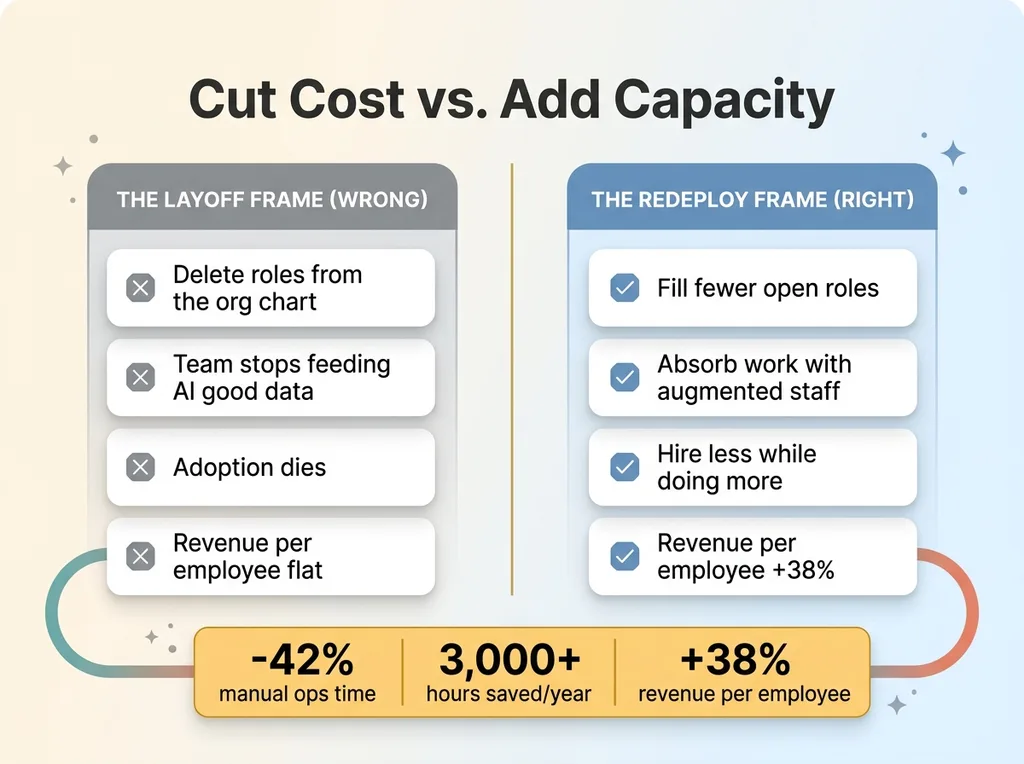
I trust this method because I have run it on my own business. AI cut my manual operations time by 42% and saves more than 3,000 hours a year across the brand. Revenue per employee is up 38%. Those are not slide numbers. They came out of systems I built and track.
And you do not have to take the projection on faith. I track the ROI per deliverable so the CFO can audit the claim against actuals, instead of trusting a forecast in a deck. The estimate is the starting line. The log is the proof.
Redeploy Capacity, Don't Cut Headcount First
Now the strategic point, and it is the one that flips the whole conversation.
 Cut headcount vs. redeploy capacity
Those 19 roles were open. Not filled. The manufacturer was growing and about to hire 19 more people to keep up. Nobody's job was on the line. The real decision was how many of those new hires they actually needed to make.
That changes the smart play entirely. For a growing company, the move is usually to fill fewer of the open roles and absorb the work with augmented existing staff. You do not fire anyone. You hire less while doing more.
That is the +38% revenue-per-employee story in plain terms. AI lets you grow revenue without growing headcount in a straight line. The augment tier pulls your current people off grunt work and onto the higher-value work you were about to hire for anyway.
This is the difference between cutting cost and adding capacity. AI replaced the typing, not the strategy in my own business. My team did not shrink. The work each person could carry expanded, so we grew without the linear hiring drag.
One honest caveat. This only works if leadership actually redeploys the freed time. If you automate 10 hours a week out of a role and those hours dissolve into more meetings, you got nothing. The capacity is real, but capturing it is a management decision, not an AI feature. The tool gives you the hours. You still have to spend them on something that matters.
The Recommendation: Start With the Low-Risk Quick Win
So what did I actually tell the CFO?
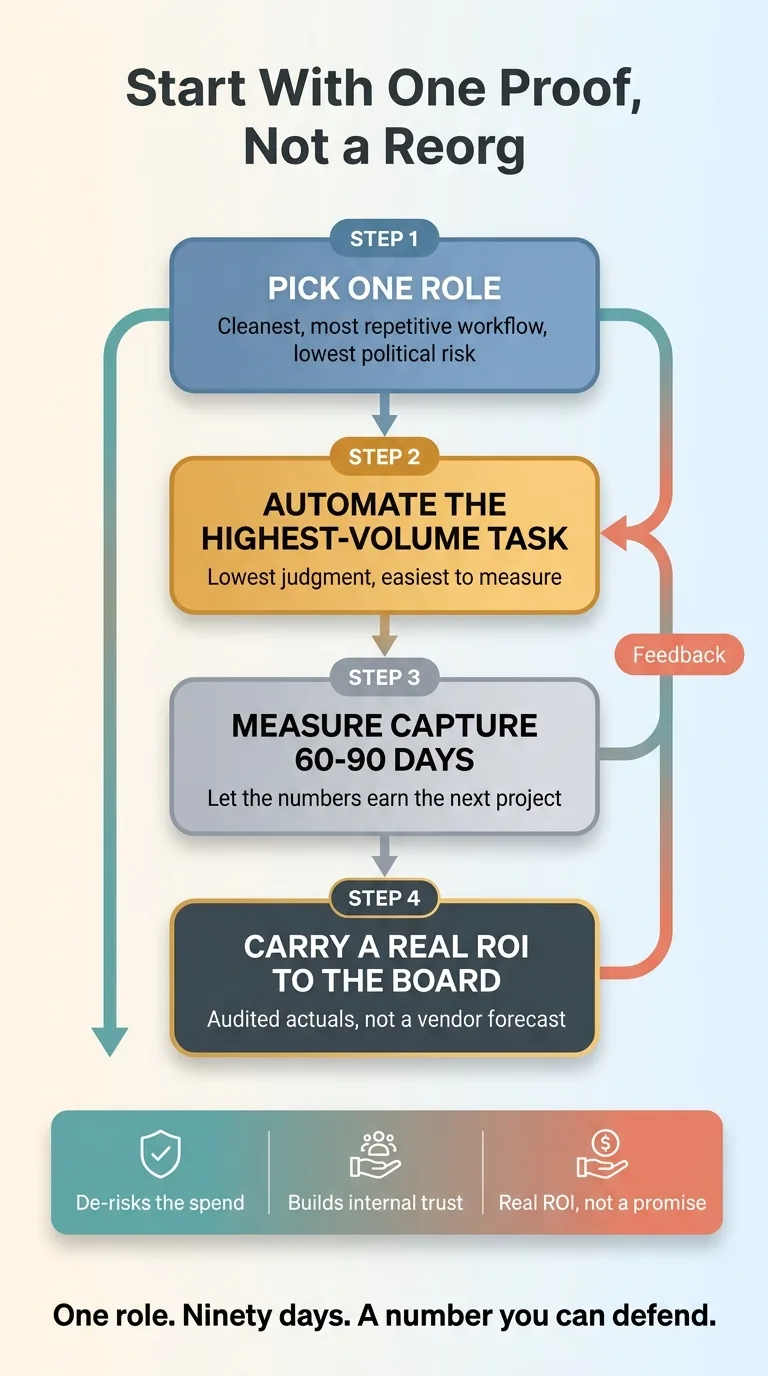 Proof-first quick win approach
Do not reorganize 19 roles. Do not run a company-wide AI transformation. That is how you get a six-figure spend, a stalled rollout, and a team that distrusts the next idea before you pitch it.
Pick one role. Specifically, the one Tier 1 or strong Tier 2 role with the cleanest, most repetitive workflow and the lowest political risk. Build the proof there first.
In this case the lead was obvious: automate the highest-volume, lowest-judgment task in a single role. Measure capture for 60 to 90 days. Let the numbers earn the next project. No layoffs, no reorg, just one clean win that pays for itself and tells you whether your estimates hold.
Proof-first beats big-bang for three concrete reasons. It de-risks the spend, because you are betting on one workflow, not the org chart. It builds internal trust, because the team sees AI take grunt work off their plate instead of taking their jobs. And it hands the CFO a real ROI figure to carry to the board, instead of a vendor's promise dressed up as a forecast.
And critically, the system stays accountable. Every automation I build stops for a person at the decision point, so nobody loses ownership of the outcome. The AI does the volume. The human still owns the call. That is what keeps a quick win from quietly creating new risk while it saves time.
One role. Ninety days. A number you can defend. That is the recommendation, every time.
Getting the Honest Version of This Analysis for Your Roster
If a board or a CFO is asking the headcount question, the worst possible response is a confident guess in either direction. "AI replaces half of these" is reckless. "AI changes nothing" is wrong. Both cost you money and credibility.
The honest answer to which jobs does AI replace is almost always the same shape. A few roles are genuine replacements. Most get meaningfully faster. And you should start with exactly one proof before you touch the rest. That is the AI workforce analysis a CFO can actually act on.
What I produce is the role-by-role tiering with a conservative ROI attached to each one. Replace, augment, or leave alone, with the automatable hours counted, discounted, and net of build cost. Not a salary-deletion fantasy. A map of where real capacity hides and what it is worth in year one.
The difference between my version and a consultant's is simple. I build these systems, I do not just advise on them. The ROI number comes from someone who has shipped the automation in a real business, measured the capture, and lived with the maintenance. When I tell you a collections workflow captures 8 to 10 hours a week, it is because I have built things like it and watched the log.
If the headcount question is on your desk and you want the honest answer instead of a guess, I can run this same analysis on your own roles. You will get the tiering, the conservative ROI, and a recommendation for the single proof to build first.
Ready to bring AI leadership into your company?
I work with a small number of companies at a time. If you're serious about AI, apply to work together and I'll review your application personally.
Get AI insights for business leaders
Practical AI strategy from someone who built the systems — not just studied them. No spam, no fluff.
Hodgen.AI
Ready to automate your growth?
Book a free 30-minute strategy call with Hodgen.AI.
Book a Strategy Call