Health App Security Layers: Why Encryption Isn't Enough
Encryption is one layer of health app security. Here are the layers that actually stopped real PHI exposure: RLS, server-side auth, signed URLs, and audit logs.
By Mike Hodgen
The Sentence That Should Worry You: "We Encrypt the Data"
I hear it on almost every call. A founder tells me, "We encrypt our data, so we're secure," and treats it as the end of the conversation. It's the start of one.
I've built two health apps. A private health dashboard for a family member, and a child-development app for a client. Both shipped with AES-256 field-level encryption from day one. Both had real, exploitable exposure anyway.
That's not a contradiction. It's the whole point. Understanding health app security layers means understanding that encryption answers exactly one question, and it's not the question most attackers are asking.
Encryption protects data at rest. If someone steals your database file, the raw bytes are useless without the key. Good. Necessary.
But encryption does nothing about a wide-open API that hands out records to anyone who asks. It does nothing when one logged-in user can read another user's medical history by changing a number in a URL. It does nothing about a medical image sitting in a public storage bucket that anyone with the link can download.
In both apps I built, the data was encrypted and still exposed. The holes weren't in the cryptography. They were in authorization, in storage configuration, in my git history.
Here's my thesis: encryption is one layer of maybe six, and the layers that actually saved me were the boring ones. Row-level security. Server-side authorization. Private buckets. Audit logs.
This article maps the full stack, layer by layer, using the real holes I found in my own apps. If you're storing sensitive customer data and "we encrypt it" is your entire security story, you have gaps right now. I'll show you where to look.
What Encryption Actually Protects (and What It Doesn't)
Let me be precise, because vagueness here gets people breached.
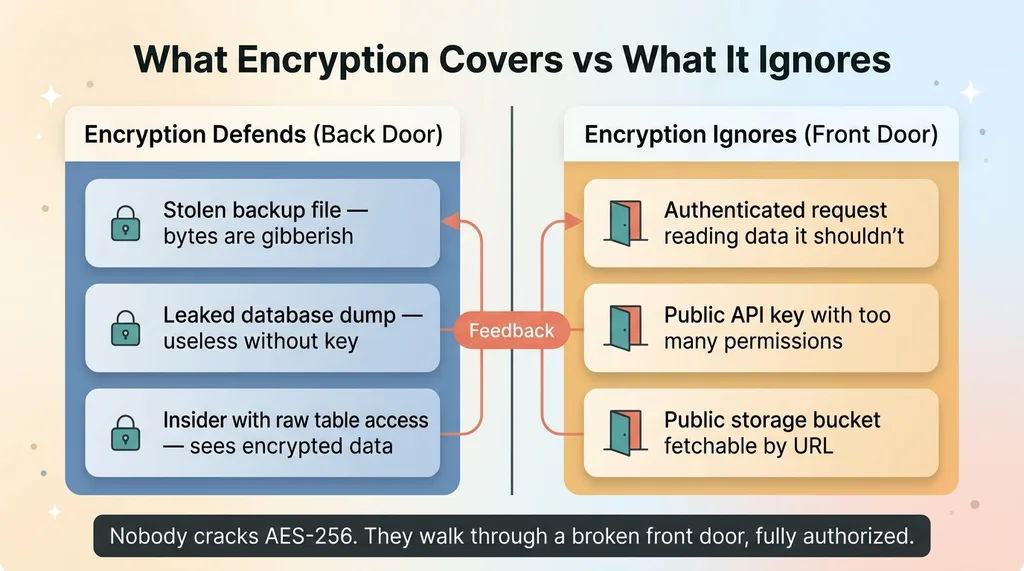 Encryption protects the back door, not the front door
The threat model encryption covers
Field-level AES-256-GCM protects against a specific set of attacks. A stolen backup file. A leaked database dump posted on a forum. An insider with raw table access who shouldn't have it. In all of these, the attacker holds the bytes but not the key, so the data is gibberish.
That's a real category of threat, and you should defend against it. Encryption is genuinely necessary.
But notice the common thread: every one of those attacks happens when someone gets the raw bytes without going through your application. Encryption answers exactly one question. "What if someone gets the raw bytes."
The threats it ignores entirely
Here's what encryption does nothing about.
An authenticated request that's allowed to read data it shouldn't. The user is logged in, the request is valid, your app decrypts the data and hands it over, because your authorization logic said yes when it should have said no.
A public API key with too many permissions, querying tables it should never touch.
A file sitting in a public bucket, fetchable by anyone with the URL, no authentication required.
In every one of these cases, your encryption works perfectly. The data gets decrypted and served to the wrong person, exactly as designed, because the design was wrong.
Most real breaches happen through the front door, fully authorized, because authorization was broken. Not because someone cracked AES-256. Nobody cracks AES-256.
This is also why encrypting data doesn't make you compliant. Auditors don't just ask whether the bytes are encrypted. They ask who can access them, under what conditions, and whether you can prove it after the fact. Encryption is one checkbox on a much longer list.
So when someone tells me "encryption is not enough," I agree, but I want to be specific about why. Encryption defends the back door. The front door is where you get robbed.
Layer 1: RLS That Defaults Closed (The Leak I Found First)
The first real hole I found wasn't in encryption. It was in row-level security.
A wide-open policy leaked PHI through the anon key
One app had a Row-Level Security policy so permissive that protected health information was readable through the public anonymous key. That key ships in the client. It's in the browser, the mobile app, anywhere the frontend runs. It's meant to be public.
Which meant anyone with the URL and that publishable key could query sensitive records directly. No login required. The encryption was working flawlessly while the database happily decrypted and served the data to anonymous strangers.
Let me explain RLS in plain terms, because this matters for non-engineers. Row-Level Security is the database itself deciding, for every single row, whether a given request is allowed to see it. Done right, it's a guard standing at the data, checking credentials on every query.
The problem is the default. A policy that says "allow if true" lets everyone through. That's what I found, and I'm not alone. Nine of my live databases were readable by anyone with the URL before I tightened them. This is endemic.
Service-role-only on sensitive tables
The fix has two parts.
First, default deny. Every table starts locked. You then write narrow policies that grant specific access to specific authenticated users. "A user can read their own records, nothing else." Never "allow if true."
Second, for the most sensitive tables, lock them to service-role only. No client-side key, public or otherwise, can touch them directly. The app's server mediates every single read. The frontend asks the server, the server checks who's asking, and only then does the data move.
The takeaway for a CEO: a misconfigured RLS policy makes your encryption irrelevant. The database isn't being broken into. It's handing out the data willingly, decrypted, to anyone who asks.
Layer 2: Server-Side Authorization That Doesn't Trust the Request
The second hole I found is the one I find most often in apps built by others, especially AI-generated ones.
IDOR: when one user can touch another's data
It's called an IDOR. Insecure Direct Object Reference. The name is ugly but the idea is simple.
A user makes a request that includes an ID. Maybe it's in the URL, maybe it's in the request body. The app uses that ID to fetch a record. The problem: the user can change the ID. Swap their own for someone else's, and the app cheerfully returns the other person's data.
In a health app, that's another patient's records. One number changed in a request, and a stranger reads your medical history.
The root cause is trusting an ID that came from the request when you should have derived it from the authenticated session. The happy path works perfectly in testing, because in testing nobody tampers with the ID. That's exactly why it survives to production.
Derive identity on the server, never from the body
The rule I follow without exception: the only identity you trust is the one your auth layer establishes server-side. Everything in the request body is hostile until proven otherwise.
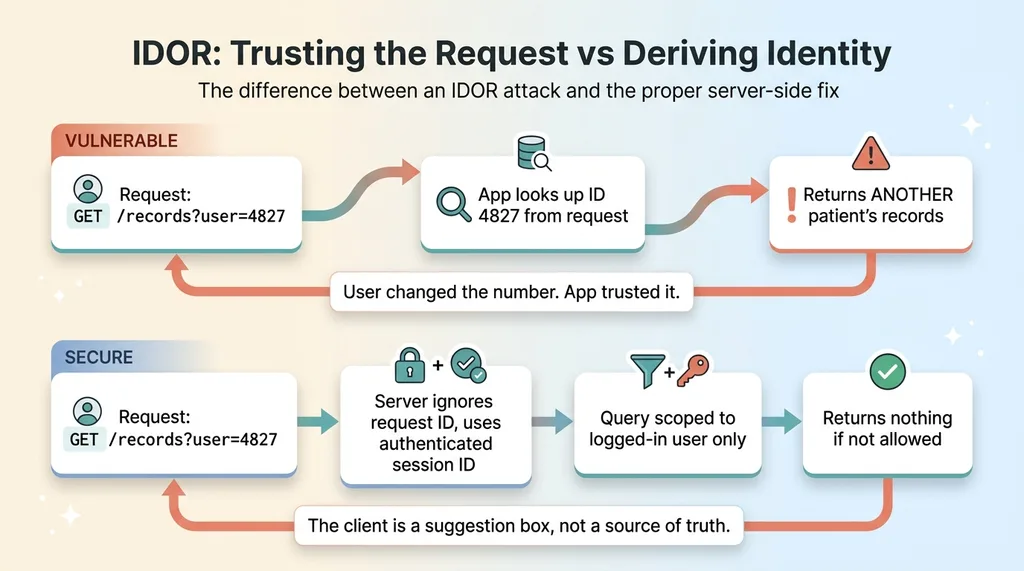 IDOR attack and the server-side fix
If a request says "give me records for user 4827," I don't look up 4827. I look up the user ID attached to the authenticated session, and I scope the query to that user. If they ask for someone else's data, the query simply returns nothing, because it was never allowed to look anywhere else.
Every query gets scoped to the authenticated user on the server. Not the client. The client is a suggestion box, not a source of truth.
IDOR is the vulnerability AI developers never think about, and it's the single most common hole I find in AI-built apps. The code generates, the demo works, the founder ships. Nobody tampered with the ID, so nobody knew the door was open.
Layer 3: Keep Sensitive Data Out of Version Control
This one surprised me when I found it in my own work, and it should make every founder uncomfortable.
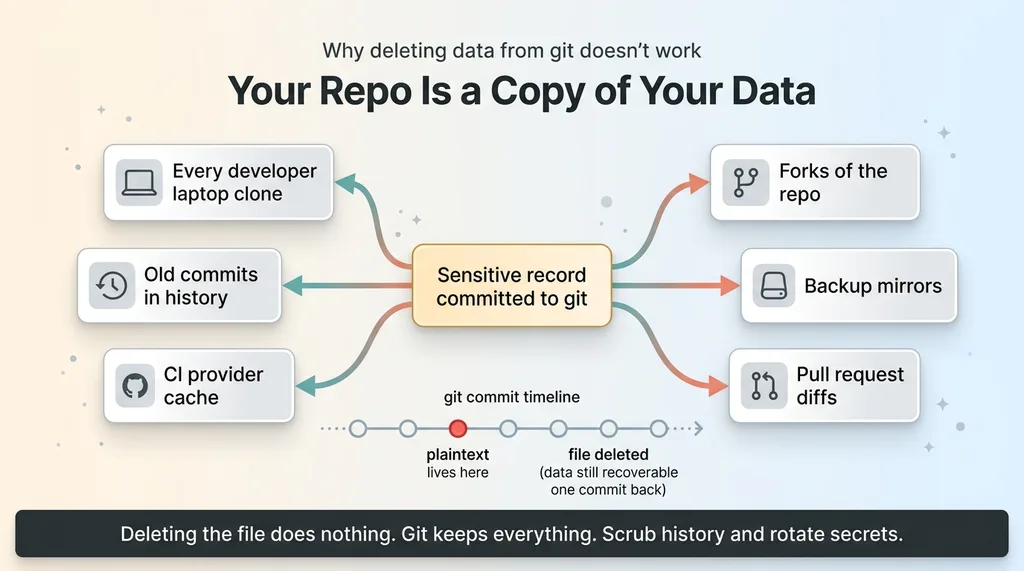 Why deleting data from git doesn't work
Sensitive records sat in git. Test fixtures with real-looking data. Seed files. And in one case, a real export someone committed "temporarily" to debug an issue and forgot about.
Here's the part people miss. Once data is in git history, deleting the file does nothing. Git keeps everything. The data is in every clone on every developer's laptop, in every old commit, in your CI provider's cache, in any fork. Removing the file in a new commit just means the plaintext lives one commit back, fully recoverable.
Your repo is a copy of your sensitive data. It lives on machines you don't control, behind security you didn't configure. Your production encryption is irrelevant if the plaintext is sitting in a commit from three months ago.
The fixes, in order.
Scrub the history properly. Not a delete, an actual history rewrite that purges the data from every commit, followed by a force push and a rotation of anything that leaked.
Add pre-commit secret and data scanning. A hook that refuses to let anything resembling PHI or credentials get committed in the first place. Prevention beats cleanup every time.
And never use real data as test data. Generate synthetic fixtures. There is no good reason for a real customer's record to live in a seed file, and every reason for it not to.
I wrote a full breakdown of how to stop committing customer data to git, because this is mundane and avoidable and still everywhere.
Layer 4: Private Buckets and Signed URLs for Media
Health apps store more than database rows. They store images, scanned documents, uploads tied to records. That's where the next hole was.
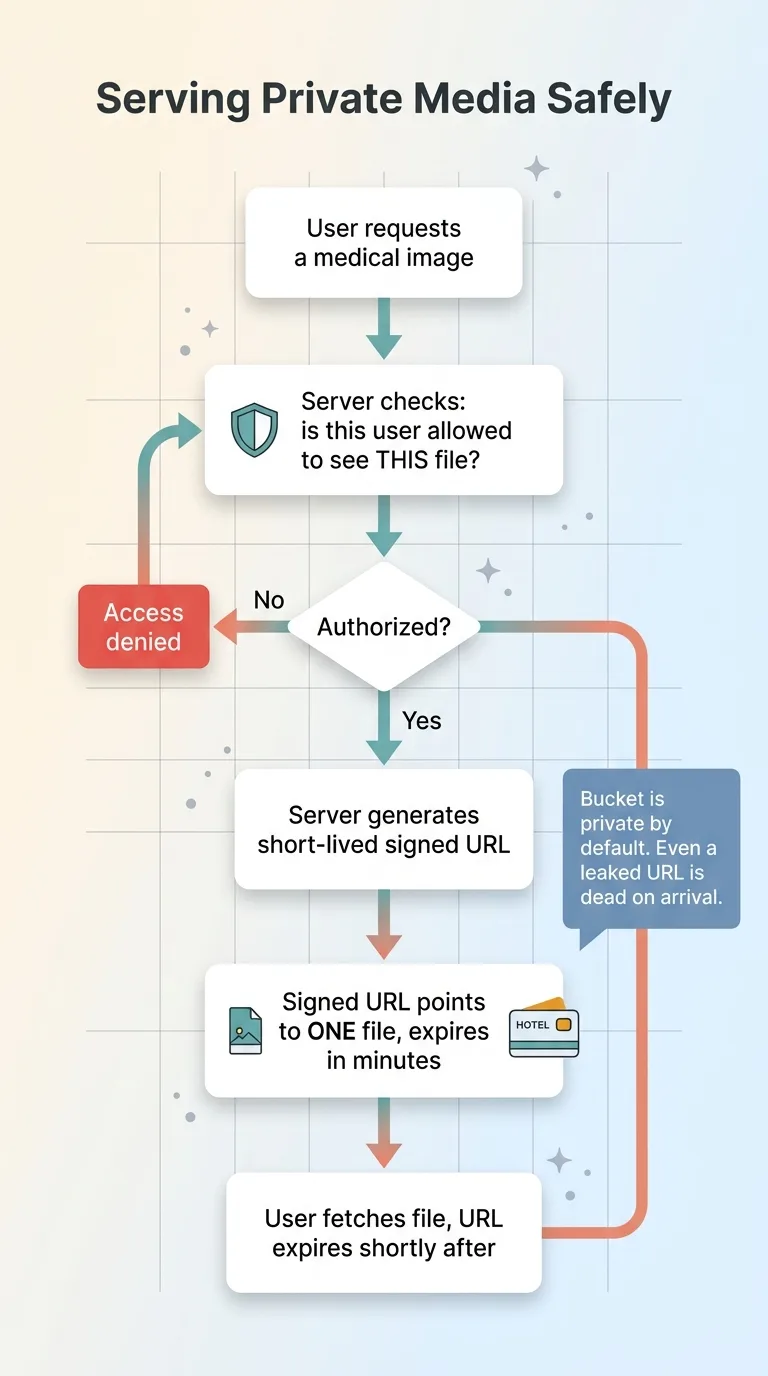 Private buckets and signed URLs flow
The media was world-readable. Any file in the storage bucket could be fetched by anyone with the URL, no authentication at all. And URLs leak constantly. They show up in server logs, in browser referrer headers, in screenshots people share, in support tickets. A URL is not a secret, and treating it like one means the file isn't protected.
The fix is two pieces working together.
Make storage buckets private by default. Nothing is publicly fetchable. The same "default closed" principle from RLS applies here. A private bucket is just another authorization boundary.
Then serve files through short-lived signed URLs, generated server-side only after the server confirms the requesting user is allowed to see that specific file.
A signed URL is a temporary, expiring key to one file. Think of it like a hotel keycard that opens one room and stops working at checkout. The server issues it only after an authorization check, it points at exactly one object, and it expires in minutes. Even if it leaks into a log, it's dead by the time anyone finds it.
Same principle every time. The boundary stays closed until the server explicitly, temporarily, opens it for a verified user.
Layer 5: Versioned Encryption With Key Rotation and an Audit Log
Now let's bring encryption back, this time as one well-built layer among many.
Why versioned AES-256-GCM matters
The durable version of encryption isn't just AES-256-GCM. It's AES-256-GCM with a key version stamped on every record.
That stamp matters because keys need to rotate. When a key is compromised, or just on a regular schedule, you want to switch to a new one. Without versioning, rotating means re-encrypting your entire database in one painful operation. With versioning, old records keep their old key version, new records use the new one, and you migrate gradually in the background.
I covered the implementation in detail in versioned AES-256-GCM with key rotation. The short version: design for rotation on day one, because retrofitting it later is miserable.
The audit log you'll wish you had
The audit log doesn't prevent a single breach. I want to be honest about that. It's not a wall. It's a camera.
It's a tamper-evident record of who accessed what, and when. And it answers the one question regulators and customers actually ask after an incident: "What was exposed, and to whom."
Without it, your answer is a shrug. With it, your answer is a precise list. That difference is the difference between a contained, reportable event and an existential crisis where you have to assume the worst about everything.
This is where "RLS plus auth plus audit" becomes the trio that matters. RLS and authorization keep people out. The audit log tells you what happened when something slips through. Defense in depth means that when one layer fails, the others contain the blast radius, and the audit log tells you exactly how big that radius was.
The Honest Map: Six Layers, and Why You Need All of Them
Here's the checklist. Hand it to your team and ask them to defend each line.
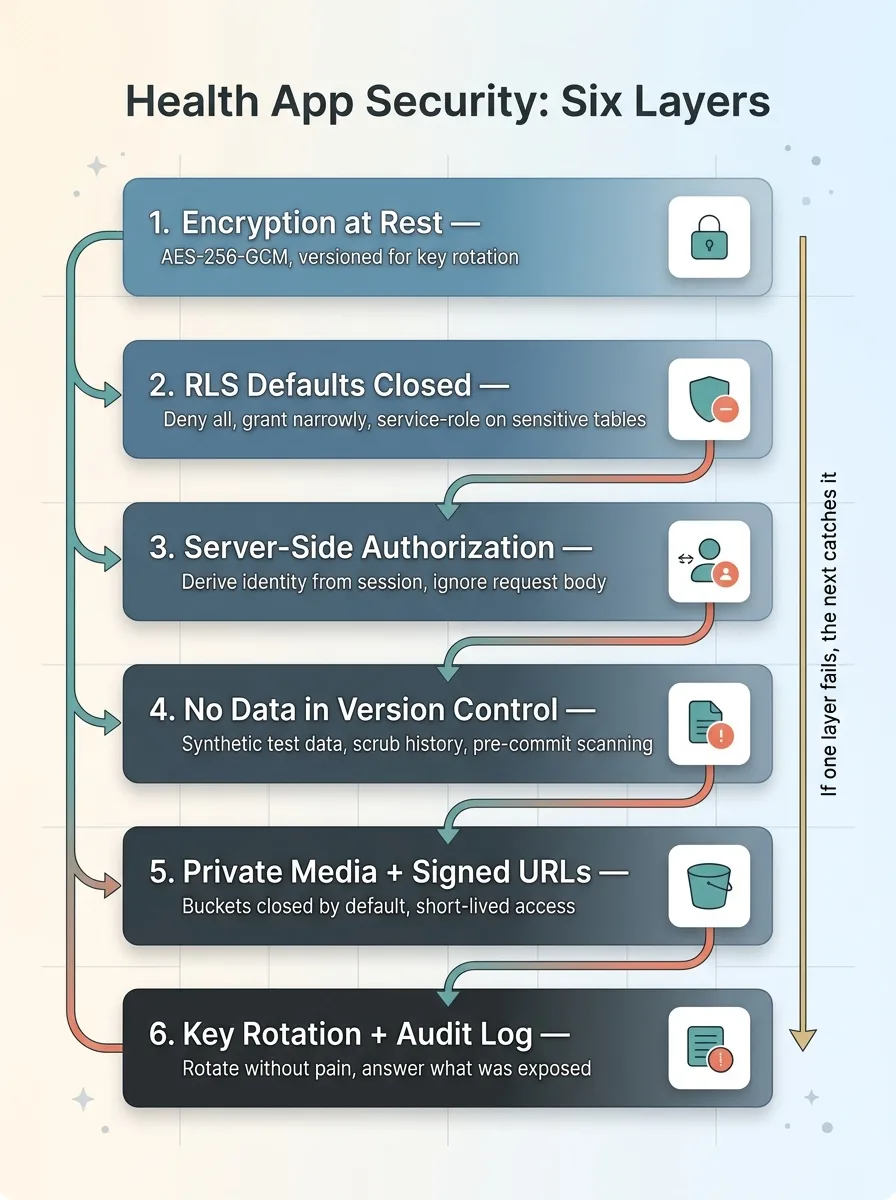 The Six Security Layers Stack
- Encryption at rest. AES-256-GCM, versioned for key rotation.
- RLS that defaults closed. Deny everything, then grant narrowly. Service-role-only on the most sensitive tables.
- Server-side authorization that ignores the request body. Derive identity from the session. Scope every query to the authenticated user.
- No sensitive data in version control. Synthetic test data, history scrubbed, pre-commit scanning.
- Private media with signed URLs. Buckets closed by default, short-lived signed access after an auth check.
- Key rotation and a tamper-evident audit log. So you can rotate without pain and answer "what was exposed" with facts.
The defense-in-depth argument is simple. Any single layer failing should not expose data, because the next layer catches it. If RLS is misconfigured, server-side auth still blocks the request. If an ID gets tampered with, the scoped query returns nothing. If a file URL leaks, the signed URL has already expired.
And here's the honest part. I shipped both of those health apps with encryption and still had four real holes. RLS, IDOR, git, and public media. I build this stuff for a living, I was paying attention, and I still missed them building solo.
If I missed four, your team is missing some too. That's not an insult. It's how this works. The happy path passes every test, and the holes only show up when someone goes looking.
That's what I do when I audit a stack. I go looking, the way an attacker or a regulator would, before either of them gets the chance.
Ready to bring AI leadership into your company?
I work with a small number of companies at a time. If you're serious about AI, apply to work together and I'll review your application personally.
Get AI insights for business leaders
Practical AI strategy from someone who built the systems — not just studied them. No spam, no fluff.
Hodgen.AI
Ready to automate your growth?
Book a free 30-minute strategy call with Hodgen.AI.
Book a Strategy Call